| [platform-swt-dev] RE: Combo with image |
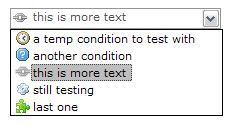
For those interested, it was quite easy to modify the Combo code to have a Composite which then had a Label and Text instead of the default Text only, resulting in the ability to display an image in the collapsed state of the Combo. See attached image. I used http://www.javawiki.org/2006_03_03/enhancing-the-combo-widget-with-images/ as a guide. Thanks Tom. Regards, Michael -----Original Message----- From: platform-swt-dev-bounces@xxxxxxxxxxx [mailto:platform-swt-dev-bounces@xxxxxxxxxxx] On Behalf Of michael Sent: Wednesday, 9 April 2008 3:58 PM To: platform-swt-dev@xxxxxxxxxxx Subject: [platform-swt-dev] Combo with image All, Some time ago there was some talk on this list regarding creating an image-combo box, @see http://dev.eclipse.org/newslists/news.eclipse.platform.swt/msg28462.html The custom control at http://www.javawiki.org/2006_03_03/enhancing-the-combo-widget-with-images/ works fine however I am trying to display an image in the NON drop-down state of the combo and have so-far tried un-successfully to do so. Does anyone have any suggestions on how I might create this, or if something already exists? Regards, Michael _______________________________________________ platform-swt-dev mailing list platform-swt-dev@xxxxxxxxxxx https://dev.eclipse.org/mailman/listinfo/platform-swt-dev
Attachment:
image_combo.PNG
Description: PNG image